Useful information about desktop, prep, printing & binding
What's New
iGen Digital Press
Dramatically increase the effectiveness of your marketing efforts. Economical full color, short run press with variable data.
Use Word, PowerPoint, Publisher with Confidence
Create print-ready PDF's on-line for free.
New Services!
We now offer high-quality hot-leaf stamping, die cutting, embossing & thermography
MetalFX
Create over 1,000,000 metallic colors using CMYK and silver.
Spot UV
The most dramatic contrast between gloss and dull available on a printed piece.
Co-Res Screening
300 LPI printing and new screens come closer to continuous tone than ever possible before.
Remote Proofing
Now available in two-page spreads so you can follow page-by-page.
Questions?
If you have a question about an article on this site, or anything related to our industry, send me an e-mail and I'll respond promptly.
Wanted!
New customers and referrals earn rewards. Learn more.


Send us your Word, PowerPoint, Publisher files!
If you aren’t an industry professional there is a pretty good chance you’re not using Quark Xpress or Adobe InDesign to create your documents. Most likely you’re using Microsoft Word, Microsoft Publisher or even Microsoft PowerPoint.
You might have run into some blank stares when you give these files to your printer. Printing companies don’t like to take files if they weren’t produced using professional software. The reasons are well founded. Files created using non-professional programs are unstable; the final output often didn’t look like the original. Files created from these programs are not meant to go through the transformations required in the electronic prepress department of a modern printing company.
However with Adobe Acrobat you can create fairly stable files from almost any program. PDF’s are made on your computer using the same environment in which the document was created. That pretty much ensures what you see on the PDF is what your final printed piece will look like the PDF you created.
Two problems crop up though. Acrobat costs $299.00 for the version you need to create PDF’s. That’s a lot of money if you don’t need to frequently make PDF’s. Additionally, in order to create print-ready you need to make sure that no fewer than one-half dozen software settings are correct. Make a mistake and your files may not print correctly.
That’s where Adobe PDF JobReady software comes in. With this free software you can easily create print-ready PDF files from your computer. You don’t need to know the settings because the software does it for you. PDF JobReady is an Adobe product, so you know it’s legitimate. You approve an on-line proof before you create the PDF. JobReady even takes care of sending us the file.
Contact me and I can help you go through the installation procedure.
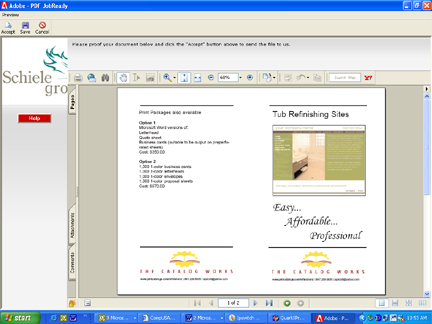
Here you can see the proof you approve prior to creating and uploading the PDF. What you see is what you get! It couldn't be easier.
Copyright 2007, The Catalog Works, All rights reserved






